
Overview
This tutorial is based on your uploaded PoseEstimation_during_Video.ipynb notebook. It explains how to load the TensorFlow OpenPose graph, define body parts and pose pairs, run pose estimation on an image, then extend the same logic to video and webcam streams. All notebook code cells and output images are included as editable tutorial material.
data/tutorials.ts. Change the title, text, images, Python code, YouTube link, and download link there.What you will learn
- Load the OpenPose TensorFlow graph in OpenCV DNN
- Define BODY_PARTS and POSE_PAIRS
- Estimate body keypoints on an image
- Draw skeleton connections
- Adapt the image pipeline to video or webcam input
Suggested tutorial flow
OpenCV DNN setup
Load the TensorFlow graph and define image input size and threshold.
Pose dictionary setup
Define body parts and skeleton connections.
Image pose estimation
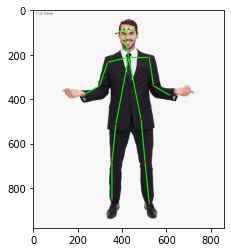
Run forward pass and draw detected body joints and lines.
Video demo
Process video frames with the same pose estimation function.
Webcam demo
Use webcam input for realtime pose estimation.
Text explanation template
Notebook-based tutorial material
This tutorial is based on your uploaded PoseEstimation_during_Video.ipynb notebook. It explains how to load the TensorFlow OpenPose graph, define body parts and pose pairs, run pose estimation on an image, then extend the same logic to video and webcam streams. All notebook code cells and output images are included as editable tutorial material.
How this page is organized
The page shows the full notebook workflow as tutorial sections. Each code cell is rendered as a separate Python code block. If the notebook cell produced an image, graph, screenshot or display output, it is shown under the matching code block and also in the results gallery.
How to edit this later
Open data/tutorials.ts and edit the object with this tutorial slug. Replace resultImages with your final screenshots, update codeBlocks with cleaned code, change videoUrl to the exact YouTube link, and replace the download URL with your final source-code ZIP or GitHub link.
Images, screenshots and results
Add your result screenshots, graphs, model outputs, detected objects, confusion matrices, or interface snapshots here.
Python code explanation
Use one or more code blocks. After each block, explain what the code does in simple teaching language.
Notebook cell 0: import cv2 as cv ## pip install opencv-python
import cv2 as cv  ## pip install opencv-python
import matplotlib.pyplot as plt
This code block is extracted from the uploaded Jupyter notebook. Replace or rewrite the explanation later with your final teaching notes for this step.
Notebook cell 1: net = cv.dnn.readNetFromTensorflow("graph_opt.pb") ## weights
net = cv.dnn.readNetFromTensorflow("graph_opt.pb") ## weightsThis code block is extracted from the uploaded Jupyter notebook. Replace or rewrite the explanation later with your final teaching notes for this step.
Notebook cell 2: inWidth = 368
inWidth = 368
inHeight = 368
thr = 0.2
This code block is extracted from the uploaded Jupyter notebook. Replace or rewrite the explanation later with your final teaching notes for this step.
Notebook cell 3: BODY_PARTS = { "Nose": 0, "Neck": 1, "RShoulder": 2, "RElbow": 3, "RWrist": 4,
BODY_PARTS = { "Nose": 0, "Neck": 1, "RShoulder": 2, "RElbow": 3, "RWrist": 4,
               "LShoulder": 5, "LElbow": 6, "LWrist": 7, "RHip": 8, "RKnee": 9,
               "RAnkle": 10, "LHip": 11, "LKnee": 12, "LAnkle": 13, "REye": 14,
               "LEye": 15, "REar": 16, "LEar": 17, "Background": 18 }

POSE_PAIRS = [ ["Neck", "RShoulder"], ["Neck", "LShoulder"], ["RShoulder", "RElbow"],
               ["RElbow", "RWrist"], ["LShoulder", "LElbow"], ["LElbow", "LWrist"],
               ["Neck", "RHip"], ["RHip", "RKnee"], ["RKnee", "RAnkle"], ["Neck", "LHip"],
               ["LHip", "LKnee"], ["LKnee", "LAnkle"], ["Neck", "Nose"], ["Nose", "REye"],
               ["REye", "REar"], ["Nose", "LEye"], ["LEye", "LEar"] ]
This code block is extracted from the uploaded Jupyter notebook. Replace or rewrite the explanation later with your final teaching notes for this step.
Notebook cell 4: img = cv.imread("pose.png")
img = cv.imread("pose.png")This code block is extracted from the uploaded Jupyter notebook. Replace or rewrite the explanation later with your final teaching notes for this step.
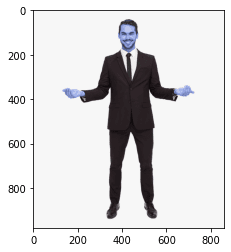
Notebook cell 5: plt.imshow(img) ##BGR
plt.imshow(img) ##BGR<matplotlib.image.AxesImage at 0x18475abd088>
This code block is extracted from the uploaded Jupyter notebook. Replace or rewrite the explanation later with your final teaching notes for this step.
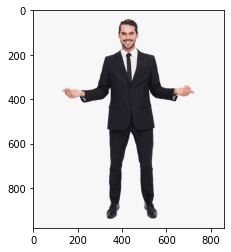
Notebook cell 6: plt.imshow(cv.cvtColor(img, cv.COLOR_BGR2RGB))
plt.imshow(cv.cvtColor(img, cv.COLOR_BGR2RGB))<matplotlib.image.AxesImage at 0x18476ffa888>
This code block is extracted from the uploaded Jupyter notebook. Replace or rewrite the explanation later with your final teaching notes for this step.
Notebook cell 7: #255/2 = 127.5
#255/2 = 127.5
def pose_estimation(frame):
    frameWidth = frame.shape[1]
    frameHeight = frame.shape[0]
    net.setInput(cv.dnn.blobFromImage(frame, 1.0, (inWidth, inHeight), (127.5, 127.5, 127.5), swapRB=True, crop=False))
    out = net.forward()
    out = out[:, :19, :, :]  # MobileNet output [1, 57, -1, -1], we only need the first 19 elements

    assert(len(BODY_PARTS) == out.shape[1])

    points = []## list

    for i in range(len(BODY_PARTS)):
        # Slice heatmap of corresponging body's part.
        heatMap = out[0, i, :, :]

        # Originally, we try to find all the local maximums. To simplify a sample
        # we just find a global one. However only a single pose at the same time
        # could be detected this way.
        _, conf, _, point = cv.minMaxLoc(heatMap)
        x = (frameWidth * point[0]) / out.shape[3]
        y = (frameHeight * point[1]) / out.shape[2]
        # Add a point if it's confidence is higher than threshold.
        points.append((int(x), int(y)) if conf > thr else None)

    for pair in POSE_PAIRS:
        partFrom = pair[0]
        partTo = pair[1]
        assert(partFrom in BODY_PARTS)
        assert(partTo in BODY_PARTS)

        idFrom = BODY_PARTS[partFrom]
        idTo = BODY_PARTS[partTo]

        if points[idFrom] and points[idTo]:
            cv.line(frame, points[idFrom], points[idTo], (0, 255, 0), 3)
            cv.ellipse(frame, points[idFrom], (3, 3), 0, 0, 360, (0, 0, 255), cv.FILLED)
            cv.ellipse(frame, points[idTo], (3, 3), 0, 0, 360, (0, 0, 255), cv.FILLED)

    t, _ = net.getPerfProfile()
    freq = cv.getTickFrequency() / 1000
    cv.putText(frame, '%.2fms' % (t / freq), (10, 20), cv.FONT_HERSHEY_SIMPLEX, 0.5, (0, 0, 0))
    return frame
This code block is extracted from the uploaded Jupyter notebook. Replace or rewrite the explanation later with your final teaching notes for this step.
Notebook cell 8: estimated_image = pose_estimation(img)
estimated_image = pose_estimation(img)This code block is extracted from the uploaded Jupyter notebook. Replace or rewrite the explanation later with your final teaching notes for this step.
Notebook cell 9: plt.imshow(cv.cvtColor(estimated_image, cv.COLOR_BGR2RGB))
plt.imshow(cv.cvtColor(estimated_image, cv.COLOR_BGR2RGB))<matplotlib.image.AxesImage at 0x1847707ad88>
This code block is extracted from the uploaded Jupyter notebook. Replace or rewrite the explanation later with your final teaching notes for this step.
Notebook cell 11: cap = cv.VideoCapture('Record_2020_10_13_23_32_51_93.mp4')
cap = cv.VideoCapture('Record_2020_10_13_23_32_51_93.mp4')
cap.set(3,800)
cap.set(4,800)

if not cap.isOpened():
    cap = cv.VideoCapture(0)
if not cap.isOpened():
    raise IOError("Cannot open video")

while cv.waitKey(1) < 0:
    hasFrame,frame = cap.read()
    if not hasFrame:
        cv.waitKey()
        break

    frameWidth = frame.shape[1]
    frameHeight = frame.shape[0]
    net.setInput(cv.dnn.blobFromImage(frame, 1.0, (inWidth, inHeight), (127.5, 127.5, 127.5), swapRB=True, crop=False))
    out = net.forward()
    out = out[:, :19, :, :]  # MobileNet output [1, 57, -1, -1], we only need the first 19 elements

    assert(len(BODY_PARTS) == out.shape[1])

    points = []## list

    for i in range(len(BODY_PARTS)):
        # Slice heatmap of corresponging body's part.
        heatMap = out[0, i, :, :]

        # Originally, we try to find all the local maximums. To simplify a sample
        # we just find a global one. However only a single pose at the same time
        # could be detected this way.
        _, conf, _, point = cv.minMaxLoc(heatMap)
        x = (frameWidth * point[0]) / out.shape[3]
        y = (frameHeight * point[1]) / out.shape[2]
        # Add a point if it's confidence is higher than threshold.
        points.append((int(x), int(y)) if conf > thr else None)

    for pair in POSE_PAIRS:
        partFrom = pair[0]
        partTo = pair[1]
        assert(partFrom in BODY_PARTS)
        assert(partTo in BODY_PARTS)

        idFrom = BODY_PARTS[partFrom]
        idTo = BODY_PARTS[partTo]

        if points[idFrom] and points[idTo]:
            cv.line(frame, points[idFrom], points[idTo], (0, 255, 0), 3)
            cv.ellipse(frame, points[idFrom], (3, 3), 0, 0, 360, (0, 0, 255), cv.FILLED)
            cv.ellipse(frame, points[idTo], (3, 3), 0, 0, 360, (0, 0, 255), cv.FILLED)

    t, _ = net.getPerfProfile()
    freq = cv.getTickFrequency() / 1000
    cv.putText(frame, '%.2fms' % (t / freq), (10, 20), cv.FONT_HERSHEY_SIMPLEX, 0.5, (0, 0, 0))

    cv.imshow('Pose estimation Tutorial ', frame)
KeyboardInterrupt:
[1;31m---------------------------------------------------------------------------
[1;31mKeyboardInterrupt Traceback (most recent call last)
[1;32m<ipython-input-12-b7829fd437bc> in <module>[1;34m
11 hasFrame[1;33m,frame [1;33m= cap[1;33m.read[1;33m([1;33m)[1;33m[1;33m
12 [1;32mif [1;32mnot hasFrame[1;33m:[1;33m[1;33m
[1;32m---> 13[1;33m cv[1;33m.waitKey[1;33m([1;33m)[1;33m[1;33m
14 [1;32mbreak[1;33m[1;33m
15 [1;33m
[1;31mKeyboardInterrupt:This code block is extracted from the uploaded Jupyter notebook. Replace or rewrite the explanation later with your final teaching notes for this step.
Notebook cell 18: cap = cv.VideoCapture(1)
cap = cv.VideoCapture(1)

cap.set(cv.CAP_PROP_FPS, 10)
cap.set(3,800)
cap.set(4,800)

if not cap.isOpened():
    cap = cv.VideoCapture(0)
if not cap.isOpened():
    raise IOError("Cannot open webcame")

while cv.waitKey(1) < 0:
    hasFrame,frame = cap.read()
    if not hasFrame:
        cv.waitKey()
        break

    frameWidth = frame.shape[1]
    frameHeight = frame.shape[0]
    net.setInput(cv.dnn.blobFromImage(frame, 1.0, (inWidth, inHeight), (127.5, 127.5, 127.5), swapRB=True, crop=False))
    out = net.forward()
    out = out[:, :19, :, :]  # MobileNet output [1, 57, -1, -1], we only need the first 19 elements

    assert(len(BODY_PARTS) == out.shape[1])

    points = []## list

    for i in range(len(BODY_PARTS)):
        # Slice heatmap of corresponging body's part.
        heatMap = out[0, i, :, :]

        # Originally, we try to find all the local maximums. To simplify a sample
        # we just find a global one. However only a single pose at the same time
        # could be detected this way.
        _, conf, _, point = cv.minMaxLoc(heatMap)
        x = (frameWidth * point[0]) / out.shape[3]
        y = (frameHeight * point[1]) / out.shape[2]
        # Add a point if it's confidence is higher than threshold.
        points.append((int(x), int(y)) if conf > thr else None)

    for pair in POSE_PAIRS:
        partFrom = pair[0]
        partTo = pair[1]
        assert(partFrom in BODY_PARTS)
        assert(partTo in BODY_PARTS)

        idFrom = BODY_PARTS[partFrom]
        idTo = BODY_PARTS[partTo]

        if points[idFrom] and points[idTo]:
            cv.line(frame, points[idFrom], points[idTo], (0, 255, 0), 3)
            cv.ellipse(frame, points[idFrom], (3, 3), 0, 0, 360, (0, 0, 255), cv.FILLED)
            cv.ellipse(frame, points[idTo], (3, 3), 0, 0, 360, (0, 0, 255), cv.FILLED)

    t, _ = net.getPerfProfile()
    freq = cv.getTickFrequency() / 1000
    cv.putText(frame, '%.2fms' % (t / freq), (10, 20), cv.FONT_HERSHEY_SIMPLEX, 0.5, (0, 0, 0))

cv.imshow('Pose estimation Tutorial ', frame)KeyboardInterrupt:
[1;31m---------------------------------------------------------------------------
[1;31mKeyboardInterrupt Traceback (most recent call last)
[1;32mC:\ProgramData\Anaconda3\lib\site-packages\IPython\core\interactiveshell.py in run_code[1;34m(self, code_obj, result, async_)
3325 [1;32melse[1;33m:[1;33m[1;33m
[1;32m-> 3326[1;33m exec[1;33m(code_obj[1;33m, self[1;33m.user_global_ns[1;33m, self[1;33m.user_ns[1;33m)[1;33m[1;33m
3327 [1;32mfinally[1;33m:[1;33m[1;33m
[1;32m<ipython-input-13-19aa5f334ae0> in <module>[1;34m
34 [1;31m# could be detected this way.[1;33m[1;33m[1;33m
[1;32m---> 35[1;33m _[1;33m, conf[1;33m, _[1;33m, point [1;33m= cv[1;33m.minMaxLoc[1;33m(heatMap[1;33m)[1;33m[1;33m
36 x [1;33m= [1;33m(frameWidth [1;33m* point[1;33m[[1;36m0[1;33m][1;33m) [1;33m/ out[1;33m.shape[1;33m[[1;36m3[1;33m][1;33m[1;33m
[1;31mKeyboardInterrupt:
During handling of the above exception, another exception occurred:
[1;31mKeyboardInterrupt Traceback (most recent call last)
[1;32mC:\ProgramData\Anaconda3\lib\site-packages\IPython\core\interactiveshell.py in run_code[1;34m(self, code_obj, result, async_)
3328 [1;31m# Reset our crash handler in place[1;33m[1;33m[1;33m
[1;32m-> 3329[1;33m sys[1;33m.excepthook [1;33m= old_excepthook[1;33m[1;33m
3330 [1;32mexcept SystemExit [1;32mas e[1;33m:[1;33m[1;33mThis code block is extracted from the uploaded Jupyter notebook. Replace or rewrite the explanation later with your final teaching notes for this step.
Download source code
Use this area to provide the complete source code, GitHub repository, Google Drive ZIP, notebook, dataset, or premium download link.
Download Notebook / Source Code